Lesson Objective
By the end of this lesson, you should be able to:
- Define Software - Explain what software is and how it differs from hardware
- Differentiate Software Types - Identify the differences between system and application software
- Explain Operating Systems - Describe the purpose and main functions of an operating system
- Identify System Components - Recognize examples of device drivers and utility software
- Classify Application Software - Categorize different types of application software by purpose
Student Login
Access exclusive lesson resources, notes, and materials.
What is Software?
Software is a collection of computer instructions, written in programming languages, that tell the hardware what to do. Unlike hardware (physical components), software consists of programs and data stored as binary code (ones and zeros).
Think of hardware as the body of a computer and software as the mind. Without software, hardware is just an expensive collection of electronic parts that can't perform any useful tasks.
Software Classification
All software can be broadly categorized into two main types: System Software and Application Software. The chart below shows how these relate to each other:
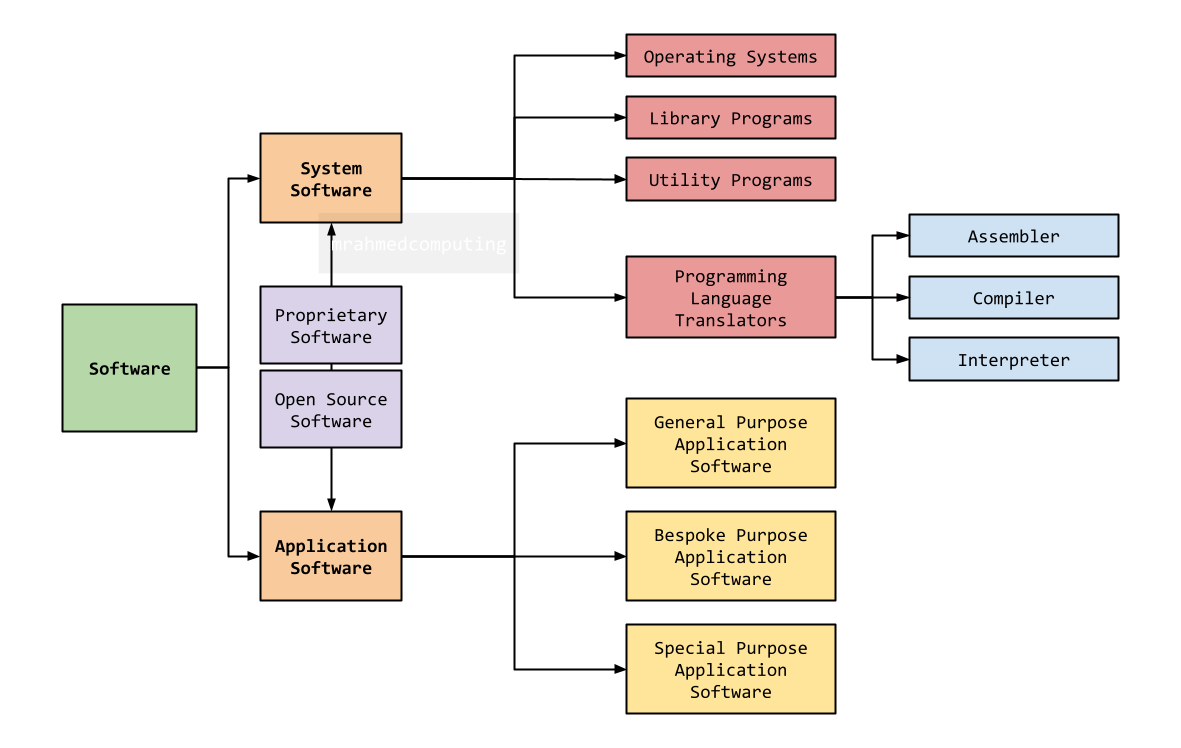
Software Classification Chart: System Software vs. Application Software
Key Differences
| Aspect | System Software | Application Software |
|---|---|---|
| Primary Purpose | Manages computer hardware and provides platform for other software | Helps users perform specific tasks |
| User Interaction | Works in background, minimal direct user interaction | Designed for direct user interaction |
| Examples | Operating Systems, Device Drivers, Utilities | Word Processors, Games, Web Browsers |
| When it Runs | Runs when computer starts, operates continuously | Runs when user opens the application |
Advertisement.
System Software
System Software consists of programs that manage the operation of a computer. It acts as an intermediary between the hardware and application software, providing essential services for the computer to function.
Types of System Software
1. Operating Systems (OS)
An Operating System is a piece of software that manages computer hardware and software resources and provides common services for computer programs.
Main Functions of an Operating System:
Controls and coordinates computer memory, allocating space to programs.
Protects data and resources from unauthorized access.
Organizes, stores, and retrieves files on storage devices.
Detects and reports system errors to users or administrators.
Manages the execution of programs (processes) on the CPU.
Controls input/output devices like printers, keyboards, and mice.
2. Device Drivers
Device Drivers are specialized programs that allow the operating system to communicate with hardware devices. Each hardware component needs its own driver.
- Printer Drivers - Enable printing functionality
- Graphics Card Drivers - Control display and video output
- USB Drivers - Manage USB devices and connections
- WiFi Drivers - Enable wireless network connectivity
3. Utility Software
Utility Software consists of special-purpose programs used to maintain and optimize a computer's functionality.
- Disk Defragmentation - Reorganizes data on hard drives for faster access
- Virus Scanner - Detects and removes malicious software
- Backup Software - Creates copies of important data for protection
- Encryption Software - Secures data by converting it to unreadable code
Advertisement.
Application Software
Application Software consists of programs designed to help users perform specific tasks. These are the programs most people think of when they hear "software."
Categories of Application Software
Create and edit documents (Microsoft Word, Google Docs)
Access and navigate the internet (Chrome, Firefox, Edge)
Provide entertainment and interactive experiences
Edit and manipulate images (Photoshop, GIMP)
Organize and analyze data (Excel, Google Sheets)
Create slideshows (PowerPoint, Google Slides)
Send and receive emails (Outlook, Thunderbird)
Play audio and video files (VLC, Windows Media Player)
Application software runs on top of system software. For example, Microsoft Word (application) runs on Windows (operating system), which communicates with your hardware through device drivers.
Video Resources
Watch these videos to better understand how different types of software work together in a computer system:
Software Classification Explained
Learn about the different categories of software.
System vs Application Software
Compare system and application software.
Operating System Functions
Understand the main functions of an OS.
Lesson Summary
- Software Definition: A collection of instructions that tell hardware what to do, stored as binary code.
- Two Main Types: System Software (manages computer operation) and Application Software (helps users perform tasks).
- Operating System (OS): Core system software that manages hardware/resources and provides services. Key functions: Memory Management, Security, File Management, Error Reporting, Process Management, Peripheral Management.
- Device Drivers: Specialized programs that enable OS to communicate with hardware (printers, graphics cards, USB devices).
- Utility Software: Maintenance programs for optimization and protection (disk defragmentation, virus scanners, backup software).
- Application Software: Task-specific programs users interact with directly (word processors, browsers, games, photo editors).
- Relationship: Application software runs on system software (especially the OS), which communicates with hardware through drivers.